A tuner on the outside, a glow on the inside
The idea: tent the iPhone Duo, put the tuning reading on the outer screen, and let the inner displays light the table red, amber or green. A 263-line probe showed the glow works for any app. The outer screen doesn't.
Part two of two about Lantern, a guitar tuner for the iPhone Duo. Part one covers the pitch detection.
The question I started with: what can a third-party app actually do with the iPhone Duo’s poses? A guitar tuner made a good test case. Stand the Duo up in a tent, like an alarm clock. The outer screen faces you and shows the reading: note and cents. Underneath, both halves of the inner display face the table and light it one solid colour, red when you’re far off, amber when you’re close, green when you’re in tune. From across the room you read the glow. Up close you glance at the number.
If that sounds familiar, it’s what Apple’s own alarm does on the Duo. More on that below.
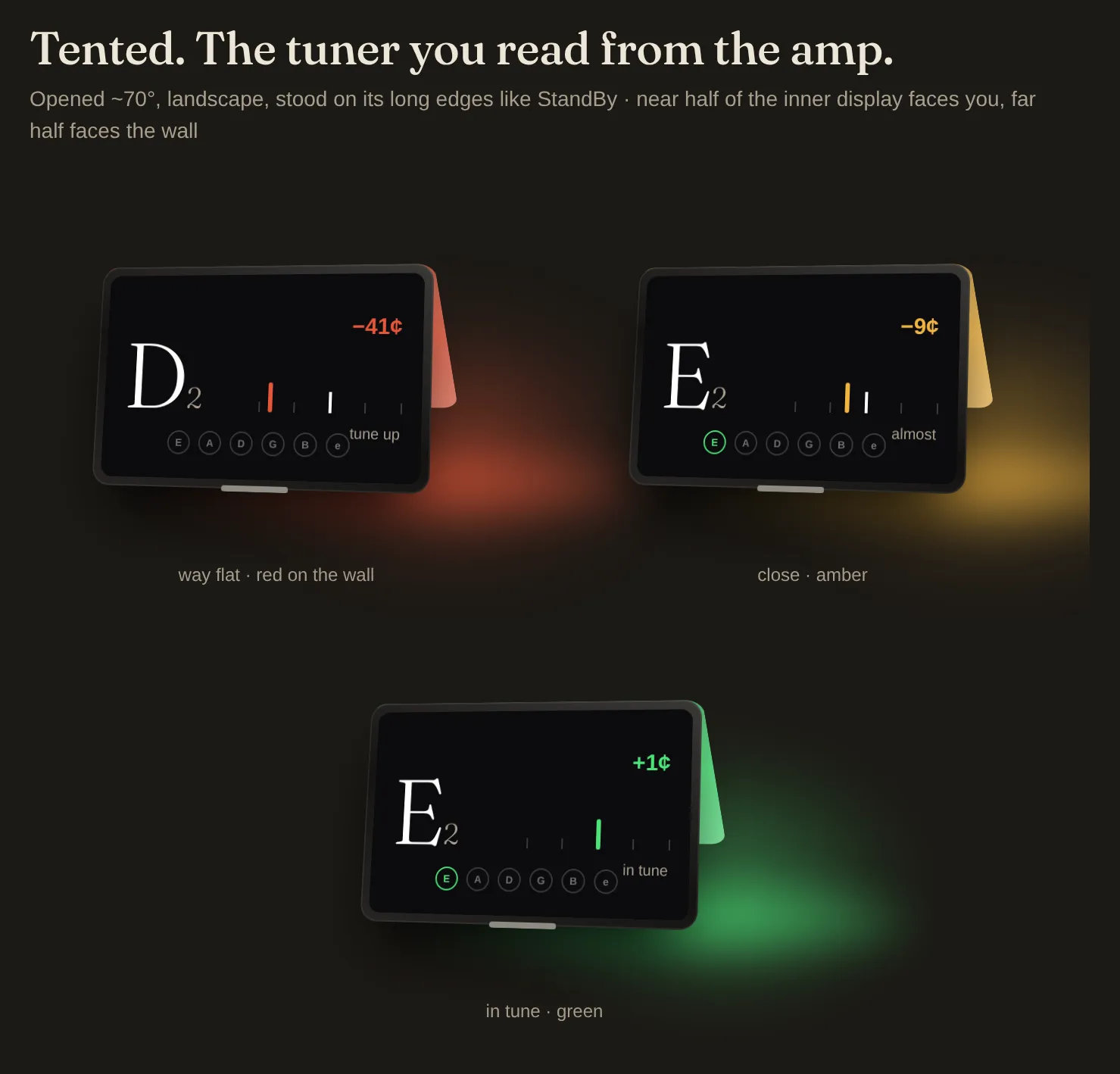
The concept mockups from the written brief: way flat, close, in tune. Somewhere between my idea and the brief, the tent got turned inside out. These put the tuner on an inner half facing you and throw the light at the wall. The idea was the reverse: the reading outside, the light underneath.
The tent was one of six poses. Half folded on a music stand, the top half would show a chord chart scrolling with the metronome and the bottom half the controls. Fully open, it would be a two-pane songbook.
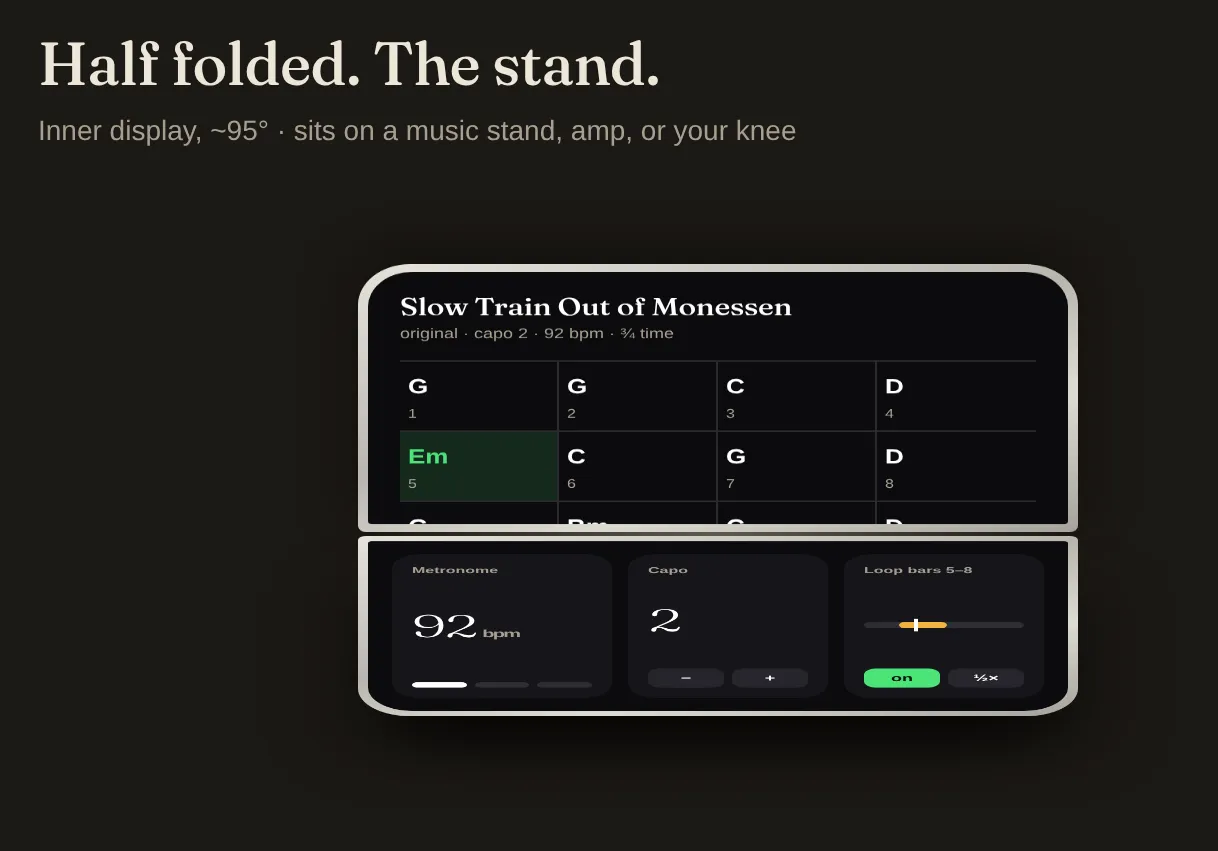
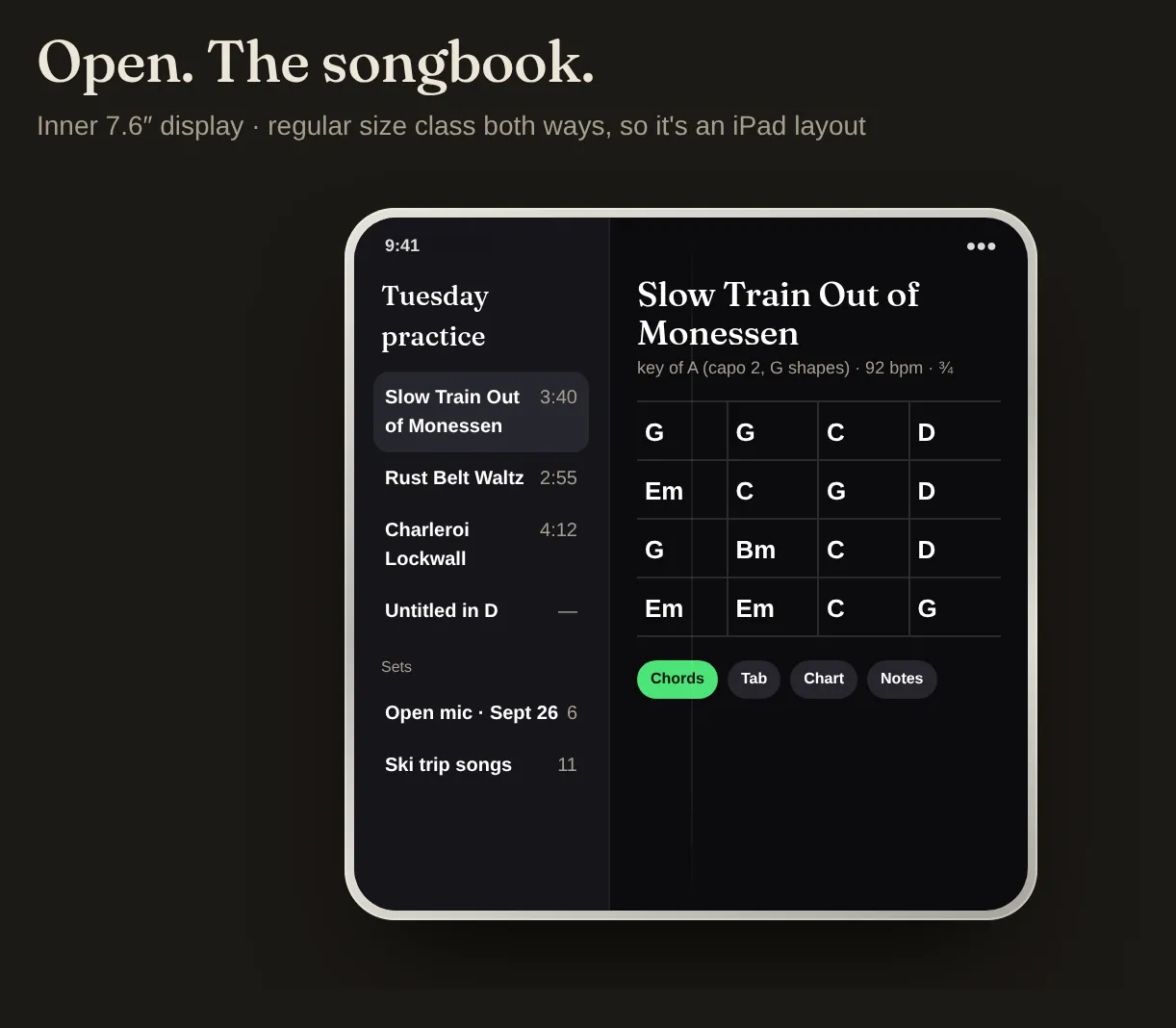
Half of the tent idea survived contact with the hardware. Finding out which half took one throwaway screen.
Building for a pose before the SDK existed
When I started two weeks ago, Xcode 27.0 was out and 27.1, with the Duo simulator and the fold APIs, was “later this month”. So the app was built to need as little from 27.1 as possible:
- Layout follows size class, never orientation. Apple’s Duo talks were firm on this: the inner display ignores the supported orientations and always reports regular by regular. Compact height selects the tented layout, and everything else gets the upright one.
- The lamp is just a full-colour view. Until the fold APIs said what an app could reach, it could be pointed at whatever part of whichever display turned out to be possible.
- Everything that matters is in a package with no UI. The pitch detector, the theory and the lock state machine have nothing to do with the fold. That turned out to be the most useful decision in the project.
What 27.1 gives you
When 27.1 landed, I had Claude read the SDK headers before writing any layout code. The new public API is small and covers the right things:
| You want | API |
|---|---|
| Fold angle and state | .onHingeChange { old, new in } in SwiftUI, UIHingeInteraction in UIKit. Angle, plus .closed, .partiallyOpen or .fullyOpen. |
| Where the crease is | reservedRegions(kind: .division): the crease’s rectangle in your view’s coordinates. |
| Two panes around the crease | ArrangementView, with .split or .overlay. |
| Standing up or on its side | Nothing new. CoreMotion’s gravity vector has been able to tell you that for years. |
Only five frameworks changed in 27.1: UIKit, SwiftUICore, SwiftUI, AVKit and AVFoundation. Nothing in the SDK lets an app draw on the outer screen. AlarmKit, ActivityKit and WidgetKit didn’t change at all.
That was the part I cared about. Apple’s launch video shows my idea almost exactly, as an alarm: it rings on the outer screen while the tented phone glows on the table underneath, and you snooze it from outside. So the hardware can do it. But Apple’s Clock app can use system features that third-party apps can’t, so the demo doesn’t show what a third-party app can do. The headers couldn’t answer that either. Only running code could.
The probe
The duo-probe branch replaces the tuner with one diagnostic screen, 263 lines long. It shows:
- the live hinge angle and status,
- the division region, its frame and whether it’s active,
- the gravity vector,
- every connected scene and which screen it’s on,
and it has three buttons: paint the near half, the far half, both or neither; change the colour; and schedule an AlarmKit alarm 30 seconds out with a snooze button.
The probe splits the view at the crease using the crease’s own shape. A wide, short region means a horizontal crease. The probe never asks about orientation, and the same rule held for the real app.
The simulator made this harder than it should have been. Xcode 27 replaces Simulator.app with something called DeviceHub, and there’s no visible control for fold pose. Screenshots from simctl came back solid black on every display. The pose controls do exist in the device plugin’s strings (pose presets, and a hinge slider marked “Internal”), but they aren’t in any menu. I eventually got the simulated Duo into a tent anyway.
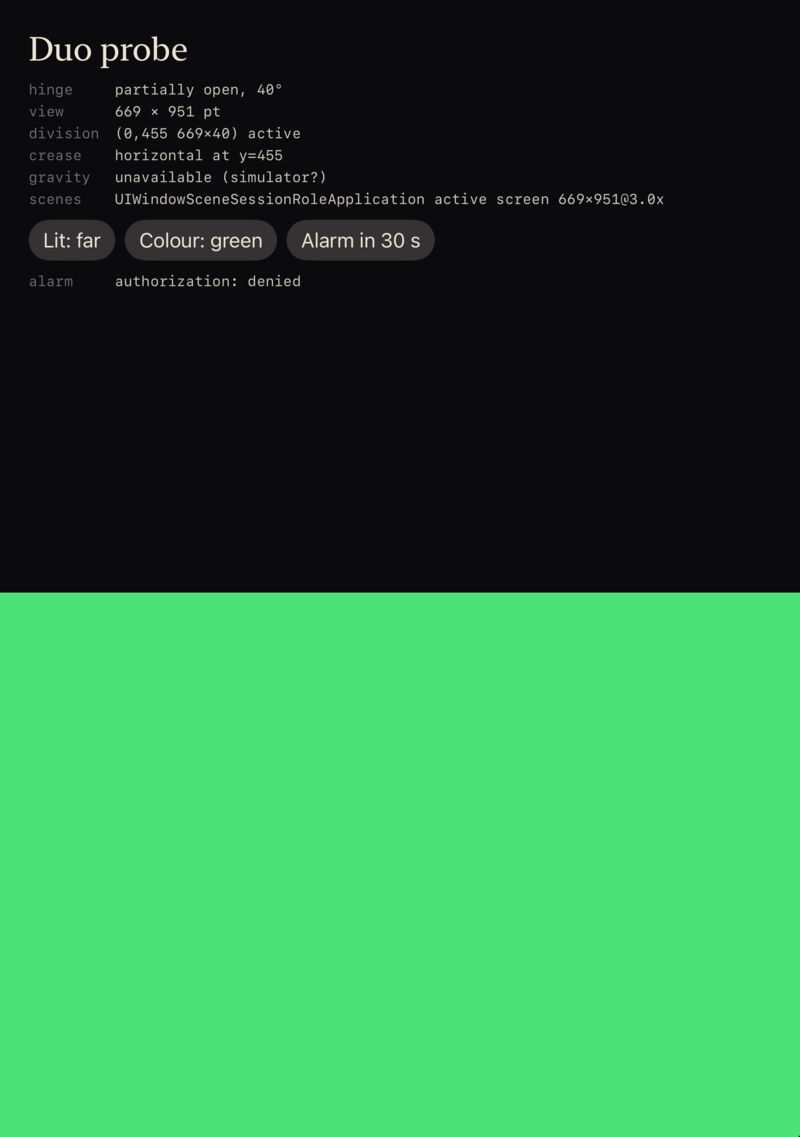
What it showed
The glow works. At 40° the app kept running in the foreground, both halves of the inner panel stayed lit under the tent, and the probe could paint either half, or both, solid green. The hinge reported its angle about 30 times a second while folding. The crease was a 40-point band at y=455. A tuner can light the table today.
The outer screen doesn’t. While the app lit the inside, the outer screen, the one facing the player, was off. The scenes line showed one scene: the app’s own window on the inner panel. There’s no second scene for the outer display and nothing in the SDK to ask for one. The reading has nowhere to go.
The alarm test never ran. AlarmKit returned denied without ever showing a prompt, and I never went back to it.
What’s left of the idea
Put the two findings together and the shape of the problem is clear. What Lantern needs is exactly what Apple’s alarm does: the reading on the outer screen while the inner display glows on the table. Apple can do both at once. Developers get the glow and not the screen, at least in 27.1.
There are three ways forward:
- Just the glow. Light the whole inner panel and let the tented phone tint the table red, amber or green. That works today. But with nothing on the outside, you can’t tell which string it thinks you’re tuning or how far off you are. It’s half the idea.
- The number outside, as a Live Activity. If the Duo shows Live Activities on the outer screen when tented, the reading could go there. That’s untested. Live Activity updates are rate-limited, too, so the needle wouldn’t move smoothly.
- Wait for Apple. Apple has opened new screen surfaces to apps before, but through templates: the Dynamic Island through Live Activities a few weeks after launch, and StandBy through widgets. Apps still can’t control the always-on display at all. If the outer screen opens, expect a template, not a canvas.
The glow on its own answers a smaller question, and the Live Activity version is a guess. The idea I set out to test needs what Apple’s own alarm already uses, and that isn’t open to developers. That’s the answer for now, and Lantern goes on the shelf until it is.
What I’d do differently
Write the probe first. The probe took an evening. It went in after the tuner, the theory package, two layouts and a lamp. It should have been the first thing written: one screen that answers “what can a third-party app do in this pose”, run in the simulator the day the SDK landed.
Check the brief against the idea. I handed the build to an agent with a written brief, and somewhere in the writing the tent got turned inside out. The mockups and the first tented layout followed the brief, not the idea. The probe tested the hardware directly, which is why it didn’t matter in the end.
Keep the valuable part separate from the risky part. The package with no UI is the part worth publishing. It doesn’t care which way the phone folds.
Everything is on GitHub under MIT: 0x4rch/Lantern. The probe is on the duo-probe branch, and the brief is PROP_HANDOFF.md, inside-out tent and all.